
Documentation
IntelliXBOM Platform Documentation
IntelliXBOM is a bill-of-materials security platform. It tracks the software, cryptography, AI/ML and hardware that make up your assets and shows the risk in them. This documentation explains what the platform answers, how data moves through it, and how to use every section, with worked walkthroughs and best practice.
New to IntelliXBOM? Start with Getting started, then use the Dashboard to read your posture and Inventory to drill into any component.
What IntelliXBOM answers
Security, compliance and engineering teams use the platform to answer three questions: what is in our systems, what is vulnerable, and what must we fix first. It covers four BOM types, each with its own dashboard band.
SBOM
- Software
- Packages, libraries, dependencies
- Licences
- Risk: CVEs, ecosystem, licence compliance
CBOM / QBOM
- Cryptographic & quantum
- Algorithms, keys, certificates
- Risk: cert expiry vs NIST IR 8547
- Quantum-vulnerable crypto
AI BOM
- AI / ML
- Models, datasets, pipelines
- Risk: model inventory by class
- AI component vulnerabilities
HBOM
- Hardware
- Devices, firmware, manufacturers
- Risk: inventory by category
- Vendor & firmware trace
Each BOM type has its own dashboard band. One scan can generate several at once.
Core concepts
Four ideas run through every screen:
- Asset: a registered system (server, application, image) that is scanned. Each asset has a health status: Critical, Healthy or Not Scanned.
- Component: one item inside a BOM: a package, a crypto object, a model or a hardware part.
- BOM file: a CycloneDX-style report, produced by a scan or uploaded (BOM, binary or CI pipeline).
- Run: one scan execution against an asset, numbered #1, #2 and so on.
How data flows
Whichever way a BOM arrives, scan, upload, binary or CI, it is stored in BOM Manager and analysed by the same views. Four sources feed four BOM types, read through seven views.
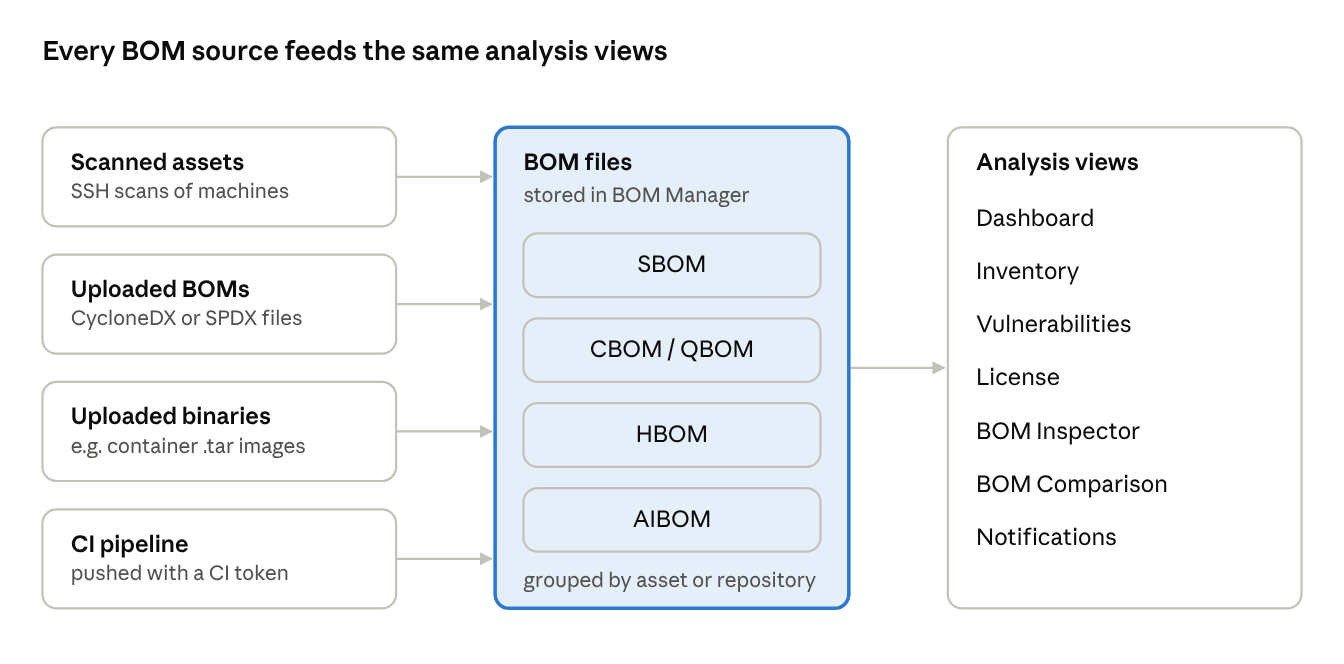
SBOM
- Software
CBOM / QBOM
- Crypto & quantum
AI BOM
- Models & data
HBOM
- Hardware
However a BOM arrives, it lands in one store and is read by one set of views.
Task walkthroughs
Highlighted: nine end-to-end tasks that take you from an empty dashboard to audit-ready evidence. Each is a short sequence of clicks on the Walkthroughs page.
Documentation sections
Ten sections, from first sign-in to a full glossary. Each stands alone, so you can jump straight to the screen you are on.
Getting started
Sign in, the screen layout, the navigation map and your first scan.
Read → 02Dashboard
The organisation-wide posture view, read as four BOM-type bands.
Read → 03Assets & scanning
Register machines, run SSH scans and read an asset in depth.
Read → 04Inventory
Browse what is inside your BOMs, from asset down to component.
Read → 05Vulnerabilities & licences
Triage CVEs by exploitability and review licence exposure.
Read → 06BOM Manager & tools
Store, score and diff BOM files: Manager, Inspector and Comparison.
Read → 07Notifications & settings
Alerts, users, roles, privileges, SSO and branding.
Read → 08Walkthroughs
Nine step-by-step tasks, from onboarding to CI pipelines.
Read → 09Best practices
How to prioritise fixes, scan well and plan quantum readiness.
Read → 10Glossary & FAQ
Glossary, FAQ and the issues observed in the demo environment.
Read →