
The Dashboard
Read organisation-wide posture across all four BOM types, band by band.
What the Dashboard shows
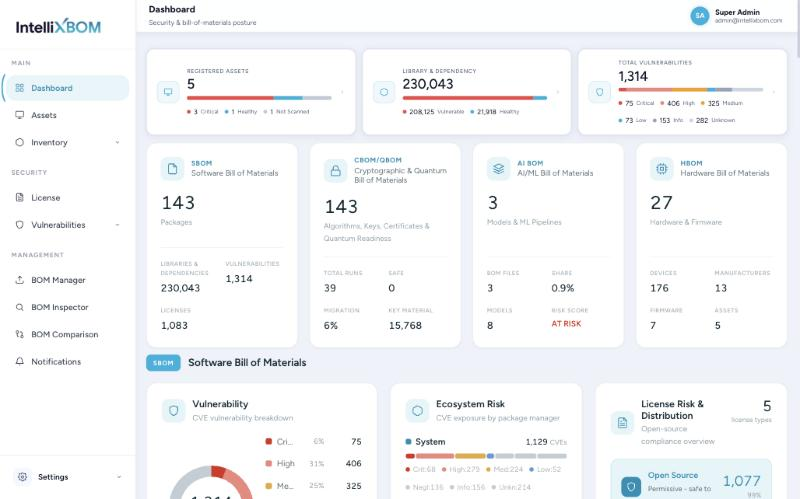
The Dashboard is the organisation-wide view of security and BOM posture. It reads top to bottom in four bands, one per BOM type, under a summary row.
SBOM band
- Vulnerability donut & fix status
- Ecosystem risk by package manager
- Licence risk & distribution
- Top vulnerable packages
CBOM / QBOM band
- Expiry vs NIST milestones
- Asset composition
- Certificate expiry & issuers
- Quantum readiness
AI BOM band
- Models, datasets, pipelines
- Models by class & framework
- Source-code location per model
HBOM band
- Hardware categories
- Vendor trace by manufacturer
- Hardware inventory table
A summary row of three headline cards sits above the four BOM-type bands.
Summary row
Three headline cards sit at the top:
- Registered Assets: total machines, split Critical / Healthy / Not Scanned.
- Library & Dependency: total components found, split Vulnerable / Healthy.
- Total Vulnerabilities: all CVEs, split by severity (Critical, High, Medium, Low, Info, Unknown).
Below the summary, one card each for SBOM, CBOM/QBOM, AI BOM and HBOM shows their key counts (packages, licences, runs, migration %, models, devices, firmware).
The four bands
- SBOM band: a donut of CVEs by severity with Fix Status (Fix Available, No Fix Yet, No Planned Fix, Fix Status Unknown); Ecosystem Risk (CVE counts per package manager); Licence Risk & Distribution; and Vulnerability Insights (Top Vulnerable Packages or Top Critical Vulnerabilities).
- CBOM band: Expiry vs NIST Milestones (certificates bucketed against NIST IR 8547, deprecation past 2030 and disallowed past 2035), Asset Composition, Certificate Expiry and Certificate Issuers.
- QBOM band: Quantum-Vulnerable and Post-Quantum Safe counts, Migration Coverage %, Overall Risk, a risk distribution chart and the Top Quantum-Vulnerable Components table.
- AI BOM band: counts of AI components, models, datasets and vulnerabilities; tiles for Models, Datasets & Lineage, ML Pipeline, Dependencies, Versioning & Hashes and Observability; charts of models by class and framework; and a card per model with its source-code location.
- HBOM band: hardware categories, vendor trace by manufacturer, and a paged Hardware Inventory table.
Click-throughs
Most Dashboard elements are links into filtered views:
| Click on | Opens |
|---|---|
| Library & Dependency card | Inventory › By Assets |
| Total Vulnerabilities card | Vulnerabilities › Scanned Assets |
| A severity in the Vulnerability donut legend | CVE Inventory filtered to that severity |
| Open Source / Commercial tiles | License Management filtered to that type |
| A CVE ID in Top Critical Vulnerabilities | That CVE on the Vulnerabilities page |
| A package name in the Top Vulnerable tables | All CVEs of that package (CVE Inventory gets a Component filter) |
Fix Status tooltips define each state: Fix Available (a newer version fixes it), No Fix Yet (no fix released), No Planned Fix (the vendor will not fix it) and Fix Status Unknown (the scanner could not tell). In Ecosystem Risk, Miscellaneous means packages whose language or package manager could not be identified from the SBOM.