
Inventory
Browse what is inside your BOMs, drilling from asset to component and across the whole organisation.
By Assets
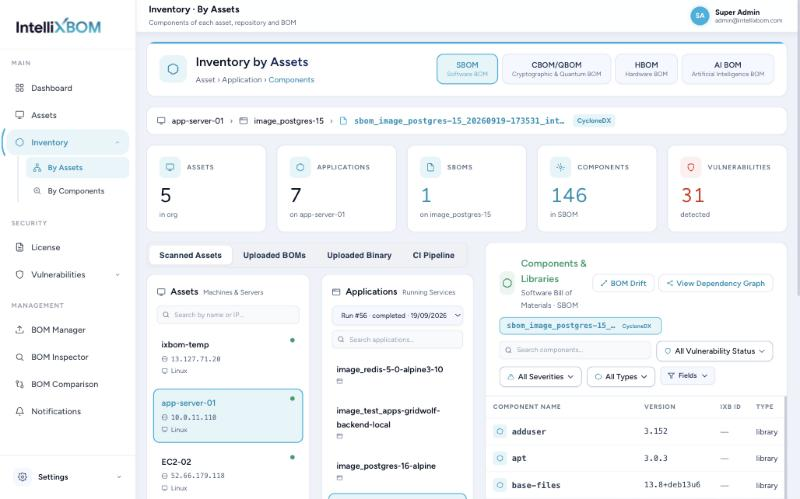
Inventory lets you browse what is inside your BOMs. By Assets follows a drill-down path: Asset › Application › Components. Pick a BOM type tab (SBOM, CBOM/QBOM, HBOM, AI BOM) and a source tab (Scanned Assets, Uploaded BOMs, Uploaded Binary, CI Pipeline), then choose an asset, a run and an application. Summary tiles update at each step.
- SBOM view: a component table with name, version, IXB ID, type, criticality and vulnerability count. Filter by vulnerability status, severity and type, and choose visible Fields.
- Component Details: a scored panel (Compliance and Coverage) grouped into Identity, Lifecycle, Ownership & Licence, Properties, Security Posture and Provenance, ending with the CVE list.
- BOM Drift: compares the current run to the previous one: components Added, Removed, Version-changed and Licence-changed, and vulnerability counts before and after.
- View Dependency Graph: a visual dependency tree for the selected SBOM.
The SBOM table in detail
The Applications panel has a run picker for viewing an older point in time. The Fields control ticks extra columns from the 21 that a component's Details panel scores: Component Name, Version, Unique Identifier, Origin, Description, Supplier, Licence, Dependencies, Usage Restrictions, Vulnerabilities, Patch Status, Criticality, Checksums or Hashes, Release Date, EOL Date, Author, Timestamp, Comments, Executable, Archive and Structured Property. A field marked Unavailable is not present in the selected SBOM; enriched SBOMs fill more of them.
The Dependency Graph has a Graph View (components in severity clusters) and a Tree View (BOM name, Direct, Transitive, Sub-transitive and Deep levels). Filter by severity, zoom, Expand/Collapse All, and export the tree as SVG or PNG.
CBOM/QBOM, HBOM and AI views
The CBOM/QBOM view shows crypto assets per run with type, OID, primitive, quantum readiness and score, and a run-level readiness score out of 100. Filter by Algorithm, Certificate, Crypto Material or Protocol; columns change with the type:
| Type | Key columns | Details panel shows |
|---|---|---|
| Algorithm | OID, primitive (signature, hash, pke), mode, quantum readiness, score, uses, files | Algorithm posture, classical security level, crypto functions, OID, NIST quantum level |
| Certificate | Quantum readiness, score, uses, files | Subject, issuer, valid from/until, format (X.509), extension, signature algorithm and public key references |
| Crypto Material | Material type, size, format (PEM), quantum readiness, score | Key ID, state (active), size, creation and activation dates |
Scores run 0-100; higher is safer. In the demo, RSA and ECDSA signatures score 10 (Critical), SHA256 scores 45 (Medium) and SHA384/SHA512 score 75 (Low).
The HBOM view filters hardware by category chips (CPU, Memory, Storage, GPU, Network, Controllers, Firmware, Power, Security, Motherboard, System, Other); Details scores the part against the 19 CERT-In HBOM minimum elements. The AI BOM view lists ML models, applications, libraries and datasets per AIBOM run.
By Components
By Components is a flat, organisation-wide list of every component (1,213 components and 1,517 versions in the demo). Filter by source and licence type (Free, Commercial), or tick Show only vulnerable. Columns show PURL, versions, licence, vulnerabilities and where it is used (places, assets, repos). Details shows Where it is used as a graph or table, per version; colour shows whether each place has vulnerabilities or none known.