
Vulnerabilities and licences
Triage CVEs by exploitability and review open-source and commercial licence exposure.
Two vulnerability views
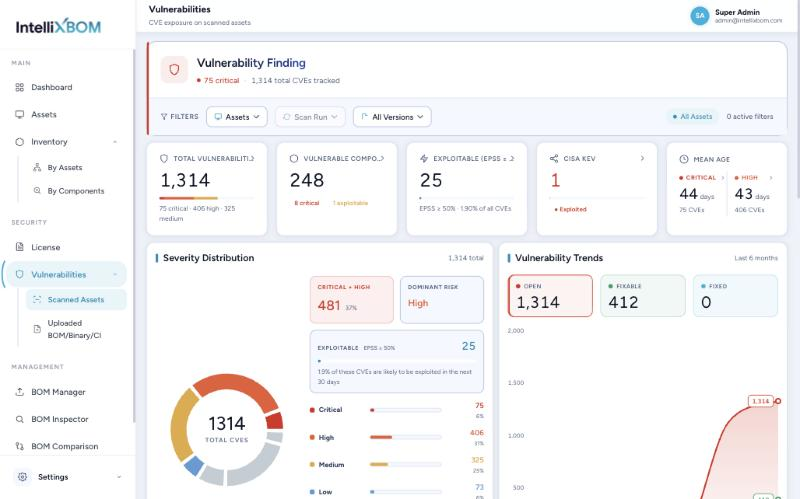
Vulnerabilities has two views, split by where the BOM came from.
Scanned Assets shows CVEs found on registered machines. Headline tiles: Total Vulnerabilities, Vulnerable Components, Exploitable (EPSS ≥ 50%), CISA KEV count, and the mean age of Critical and High CVEs. Below sit a Severity Distribution and a 6-month Vulnerability Trends chart (Open, Fixable, Fixed).
The CVE Inventory lets you search by CVE ID, component or file and filter by severity and fix status. Columns: CVSS, EPSS, published, first seen, last updated, KEV, open days and fix. Expand a row for the CVSS vector, NVD link, linked components and the Recommended Action.
Triage order
Rank by exploitability first, then severity:
- CISA KEV membership
- EPSS ≥ 50%
- Most likely to be attacked
- Critical & High
- CVSS score
- Mean age of open CVEs
- Fix status: Fix Available
- Sort by EPSS or CVSS
- Read Recommended Action
- Top 10 vulnerable packages
- One upgrade clears many CVEs
- Re-scan and check BOM Drift
A High CVE in CISA KEV or with EPSS above 50% outranks a Critical one with no known exploitation.
In Scanned Assets, expand a CVE and click View Affected Component for a panel listing every asset and component hit by that CVE, with IP, OS, installed version, Fixed in version, licence and file path. A four-level Trace shows Asset › BOM › Component › CVE. The same CVE can show different fixes per version.
Uploaded BOM / Binary / CI
The same analysis runs for files uploaded by hand or pushed by CI. Scope by Repository, Application, Type (BOM, Binary, CI) and File. Extra views: Critical & High vulnerable files, an Exploitation (EPSS) breakdown, a CVSS Score histogram, and a CVE inventory grouped By file or By CVE. By CVE lists unique CVEs with how many files each affects; Show them lists CVEs with no EPSS or CVSS score yet.
License Management
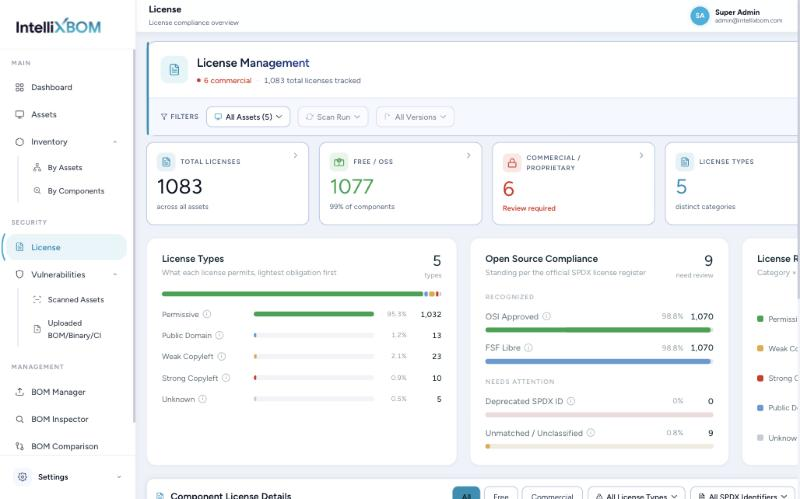
License Management shows open-source and commercial licence exposure across all assets. Filter by asset, scan run and version. Headline tiles cover Total Licenses, Free/OSS, Commercial/Proprietary (flagged Review required), License Types, and Strong Copyleft + Deprecated IDs (Needs Review).
Components are ranked by obligation, lightest first:
- MIT, Apache-2.0, BSD
- Safe for commercial use
- Keep the copyright notice
- CC0, Unlicense, 0BSD
- No conditions
- Effectively unrestricted
- LGPL, MPL, EPL
- Fine to link against
- Publish changes to the library
- GPL, AGPL
- May require releasing your source
- Review before closed-product use
- No matched identifier
- Hidden obligations
- Resolve manually
License Management ranks components by obligation, lightest first.
| Category | Meaning | Examples |
|---|---|---|
| Permissive | Safe for commercial and closed-source use; keep the copyright notice | MIT, Apache-2.0, BSD |
| Public Domain | No conditions; effectively unrestricted | CC0, Unlicense, 0BSD |
| Weak Copyleft | Fine to link against, but changes to the library itself must be published | LGPL, MPL, EPL |
| Strong Copyleft | Shipping it can require releasing your own source under the same licence; review first | GPL, AGPL |
| Unknown | Licence could not be matched to a known identifier; review manually | n/a |
Free vs Commercial: Free/OSS means the licence is OSI-approved or FSF-libre on the SPDX register; Commercial means everything else, including licences that matched no SPDX entry, and does not mean the component is paid. Every category bar, compliance tile and Risk Matrix cell filters the Component License Details table below it; Export CSV to share for legal review.