
BOM Manager, Inspector and Comparison
Store every BOM and binary, score one against a framework, and diff any two.
BOM Manager
BOM Manager is the file store for every BOM and binary. Tabs:
- Assets: BOMs generated by scans, filterable by type (SBOM, CBOM, QBOM, HBOM, AIBOM, VEX). Columns show asset, BOM file, format, scan run, generated time and status; actions are Report and BOM download.
- Uploaded BOMs: hand-uploaded BOMs, scoped to a Machine or Repository, with BOM, Report and Delete actions.
- Binaries: uploaded binaries such as container image .tar files, with size, upload state and analysis state (Analysed, Queued, Not analysed, Dispatch failed).
- CI Pipeline: BOMs pushed from CI, with build ID, commit, branch and status.
Uploading and downloading
Upload opens a side panel. Choose Machine (a registered machine and application) or Repository (pick or create a repository and application), then upload a BOM or a Binary.
| Upload | BOM type | Accepted files | Size limit |
|---|---|---|---|
| BOM | Auto-detect, SBOM, CBOM, AIBOM or HBOM | .json, .xml, .spdx, .cdx | 50 MB |
| Binary | Analysed into an SBOM | Archives, filesystem images, packages, executables, libraries and firmware (.zip, .tar, .iso, .rpm, .deb, .apk, .jar, .exe, .so, .bin and more) | 2 GB |
Downloads: BOM opens a menu (CycloneDX, SPDX, CSV or PDF); Report downloads a PDF report carrying your company logo if one is set; File (Binaries tab) downloads the original binary.
BOM Inspector
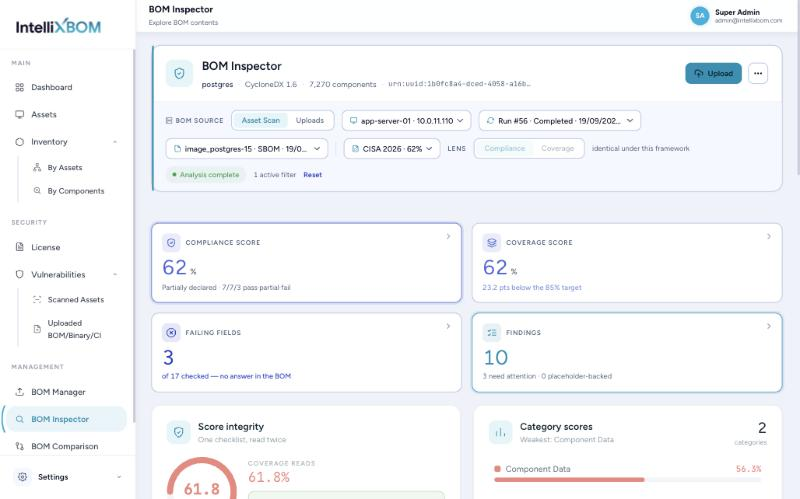
BOM Inspector scores one stored BOM against a regulatory framework. It is read-only: it never re-scans an asset or edits the BOM. Choose the source (Asset Scan or Uploads, or upload a BOM), then the framework: CERT-In v2.0, CISA 2026, NTIA 2021 (legacy), CISA 2025 (draft), BSI / EU CRA or SEBI CSCRF.
Read the results: Compliance score, Coverage score against an 85% target, failing fields, findings, and category scores. Each finding states the gap and a fix (for example Add SBOM Author or Sign the SBOM) and names the exact BOM field to add. Finding weights mark Critical (W3) and Important (W2) fields; filter Failed / Partial / Passed and Export findings. Auto-generated BOMs top out around 66.7% on some frameworks until author, signature and generation context are enriched at source.
BOM Comparison
BOM Comparison diffs any two SBOMs. Set the SBOM type (auto, SPDX, CycloneDX) and an optional checksum algorithm (MD5 to BLAKE3), and tick Exclude license changes to ignore licence-only edits. For BOM A and BOM B, choose From registry (Asset Scan or Uploads) or From file (ad-hoc upload). Compare returns Added, Removed, Version changes and License changes, each with its package list.